
Orbis Exploration Route: Use the Map for Chests, Resources, and Objectives
Build a readable Orbis route from selected layers and searches, then connect locations to Adventure Book, quest, chest, monster, and resource work.
Current Orbis version
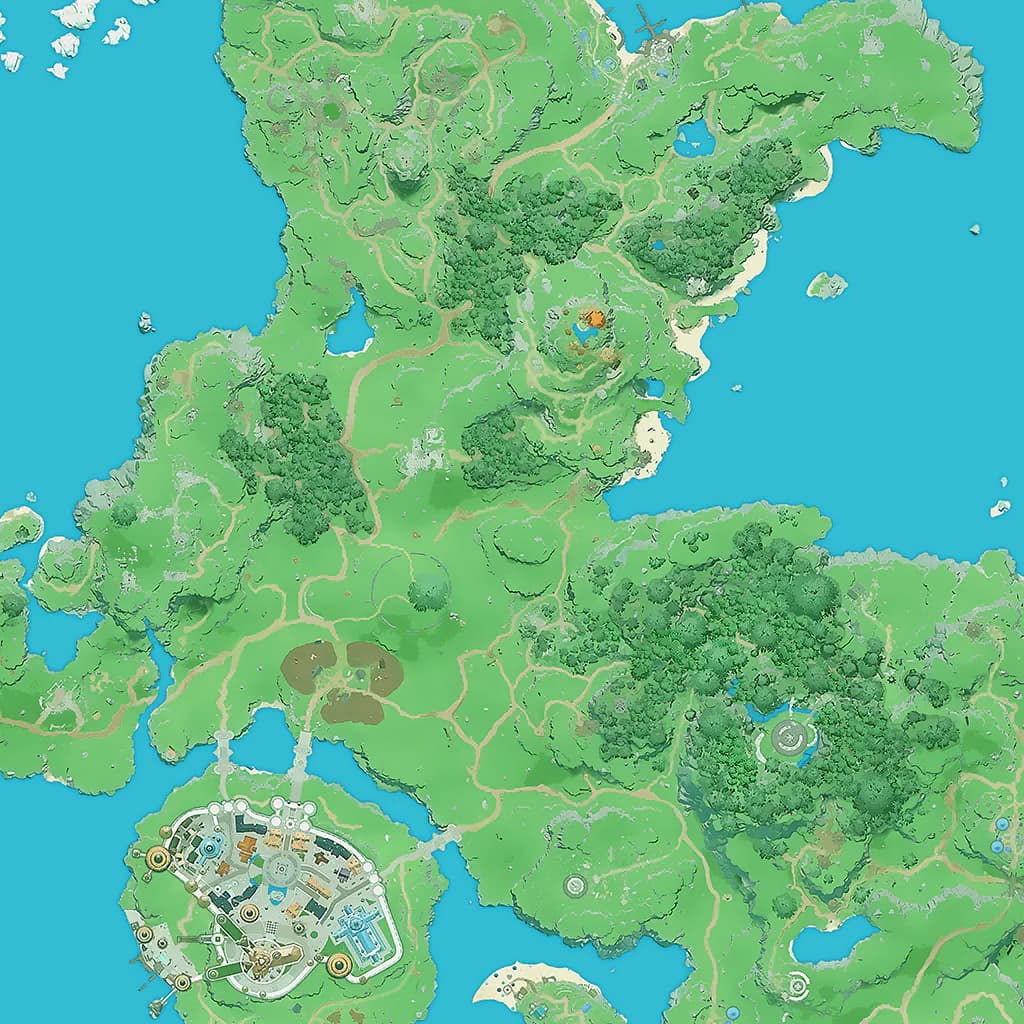
Orbis exploration: The decision to make first
Start with the question you need to answer, not with a copied endgame build. The useful route is the one that matches your unlocked roster, current inventory, and next playable objective. Orbis is the released map. Belos is not presented as current playable progression, so an Orbis route should not mix preview locations into the checklist. World map.
The Orbis map is for location questions: where is a named place, chest, resource, monster, NPC, dungeon, waypoint, or field boss, and which nearby points can be combined into one route? Start with official locations and treasure chests, then enable gathering, mining, monsters, or NPCs only when needed. Dense layers cluster at lower zoom so the terrain remains readable. Search can find records from a hidden layer, which is useful when the player knows a name but not the category.
Orbis exploration: A reliable workflow
Choose a search result or map marker and inspect its player-facing details before moving the view. Multiple selected results can remain visible for route comparison, while zooming separates clustered locations into individual points. Marking a treasure as found stores progress locally; Hide found turns the same map into a cleanup route. Copy link preserves the selected point and map view for another player. These controls answer different questions, so a found marker should never be treated as removed game content or a shared account state. Adventure Book.
Use the five category tabs to inspect the in-game Adventure Book. Connect a local save to display verified Familiar travel milestones; categories without a verified save mapping remain incomplete instead of being guessed. Familiar travel milestones are mapped from the current save. Other Adventure Book categories remain incomplete until their save mapping is verified.
Orbis exploration: How to read the evidence
Treat names, requirements, relationships, counts, and displayed values as evidence. Treat live timing, random outcomes, account-specific availability, and unlisted triggers as checks that still belong in the game. Map evidence comes from the published Orbis layers and the exact coordinates shown for their locations. Details may include coordinates, elevation, quantity, durability, or recommended power only when that value is available. A generic label remains until a public localized name is confirmed; it is safer than guessing a translation. Treasure grades and monster groups are filters, not rankings of route value. Search multiplicity indicates several known positions, not a guarantee that every spawn is simultaneously active.
Point totals are derived from the published entries, and reward thresholds remain separate milestones. The tracker shows current score, the next threshold, and the remaining point difference so the player can choose enough entries to cross a real milestone. Known rewards display their published items and quantities. A legacy or unresolved reward stays labeled instead of being assigned a guessed item. Entry names, section names, images, points, and links provide the player-facing evidence used for planning. World map.
Orbis exploration: Trade-offs before you invest
Compare one constraint at a time. Keeping the same target while changing only the route, hero, slot, or milestone makes the cost of that decision visible and prevents several assumptions from being mixed together. Orbis is the released world and therefore the default decision space. Belos remains clearly separated as a preview, while unavailable areas do not appear in normal map choices. Plan travel by grouping nearby verified points, checking waypoint access, and deciding whether completion or resource density matters more. A visually short path can still be impractical if it crosses locked content or ignores elevation. The map supplies geography and known labels, but it does not infer quest order, live respawn timing, or an account’s unlocked travel state.
Plan the next tier by comparing point value, location, and completion effort. Several nearby low-point entries may fit one map route better than a single distant target, while a named monster or field boss may need combat preparation before its points are practical. Use section filters to avoid scanning finished categories and keep the incomplete list aligned with confirmed in-game progress. The workspace cannot estimate spawn time, drop chance, travel duration, battle difficulty, or whether a hidden prerequisite blocks an entry. Quests.
Orbis exploration: Your next in-game check
For a missing point, clear the narrowest filter, search its current localized name, and check whether the relevant layer is enabled before assuming the data is absent. For a completed treasure route, mark only points actually found and keep a copied link for anything that needs a second visit. Continue from a field boss to the encounter page, from a material to its item page, or from a quest location to the quest workspace. Recheck shared links after map data changes; coordinates remain evidence, while live availability and hidden conditions must be confirmed in game. Adventure Book.
This page is read-only. Choose a save above to display verified completion. Track every published Orbis objective, calculate your exact score, and see the complete 25-step reward track. The published Orbis catalog contains 149 objectives worth 1,444 points. Named monsters, field bosses, treasure chests, Familiar travel milestones, and viewpoints award different fixed values. All 25 published point thresholds are shown. Some reward references remain in the Adventure Book table but no longer exist in the current item catalog; those rows are identified instead of being silently replaced. The Adventure Book workspace answers two connected questions: which Orbis entries remain incomplete, and how many points are needed for the next reward tier? Start with a section, search the localized entry list, and enable the incomplete-only filter when cleaning up a known category. The overview separates completed entries, earned points, and total available points. This makes the page useful for a focused named-monster hunt as well as a broader completion route without turning the Book into an undifferentiated checklist. next reward tier. Adventure Book complete. Finish by writing down one next action that can be verified: open a named page, test a rotation, visit a mapped point, confirm an unlock, or update the local plan after spending materials.